klipan.ai vs OpusClip: which is better for talking-head videos?
By Josip Misko, Founder of klipan.ai · Last updated
OpusClip turns long videos into many short clips, and its new AI Producer edits a short take from the brief you write. klipan.ai plans your raw take like a real editor, then hands you the finished edit.
Pick OpusClip if you have long podcasts, webinars or streams and want many short clips from each one, ranked and ready to schedule on a free or low-cost plan. Pick klipan.ai if you're a coach, consultant or expert with something to sell and you film raw takes to camera. You upload one take and usually get a finished edit back in under an hour. It's planned around your story, with visuals that show what you're saying.

 klipan.ai
What does klipan.ai do with a raw talking-head video?
It turns your raw take into a finished video without reshooting anything. The original take is on the left, and the video klipan.ai made from it is on the right. Turn the sound on to hear the difference.
What each tool does with a raw takeWhat is OpusClip, and what is AI Producer?
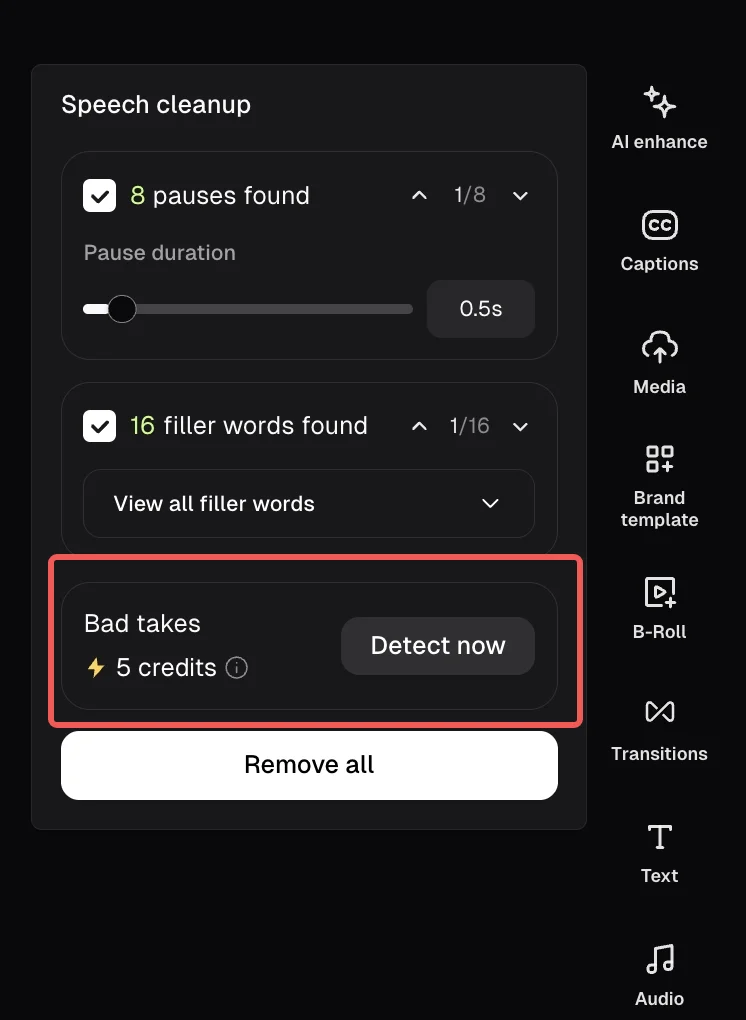
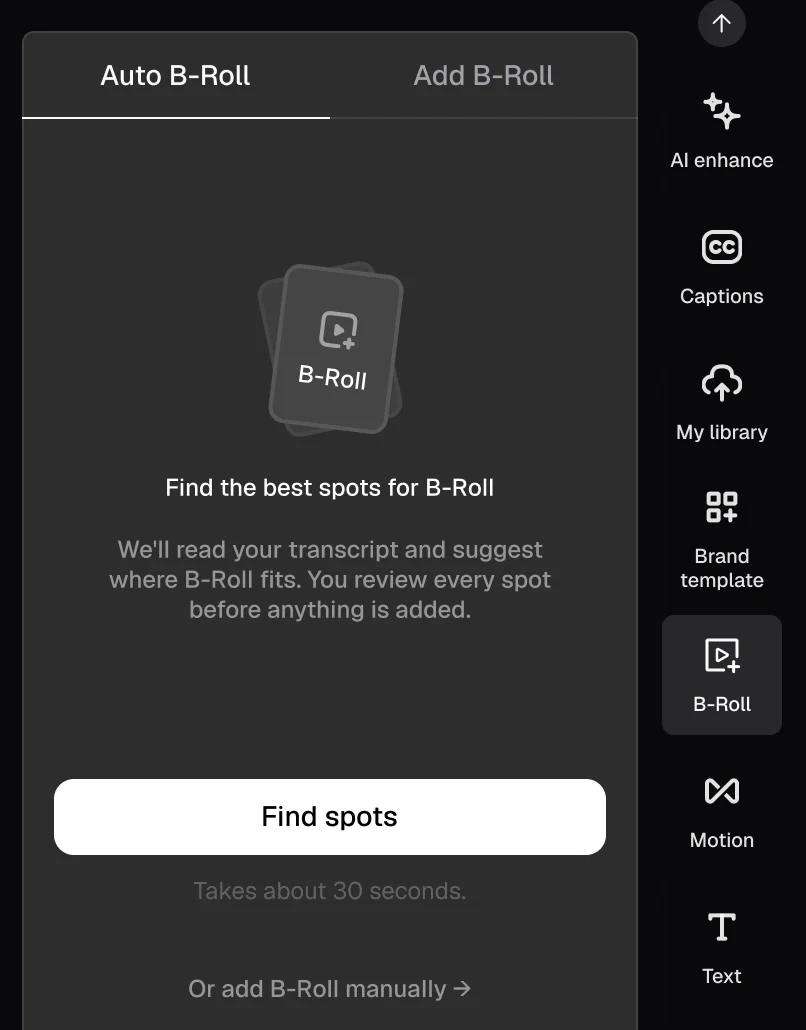
OpusClip (often written Opus Clip) is an AI clipping tool: it turns long videos into many short clips, scores each one for how likely it is to go viral, adds captions and b-roll, and posts them for you. It also has a text and timeline editor, and speech cleanup that flags pauses, filler words and bad takes for you to approve.
AI Producer is OpusClip's newer AI editor, still in beta. It takes one video of one person talking to camera, up to 5 minutes long, and returns one finished MP4 with captions, b-roll, motion graphics, music and sound effects. You tell it what you want in chat, and its planning runs on your own Claude or ChatGPT plan. It has almost no public reviews yet. Choosing between OpusClip and klipan.ai comes down to whether you want many clips from long videos, or one take edited around its story.
klipan.ai vs OpusClip: side-by-side comparison for talking-head videos
- Who it's for
- OpusClipCreators, podcasters, marketers and agencies who turn long videos into many shorts. AI Producer (beta) is for short videos of one person talking to camera.
- klipan.aiCoaches, consultants and experts who talk to camera to win clients.
- What you upload
- OpusClipA long video of up to 10 hours, or a YouTube, Zoom or Riverside link. AI Producer takes one video of one person talking to camera, up to 5 minutes and 1.99 GB.
- klipan.aiOne raw video of you talking to camera, straight from your phone. Restarts, flubs and long rambles are fine. Add your logo, b-roll, photos, music or script if you have them.
- What you get back
- OpusClipA batch of clips ranked by virality score, from 1 or 2 clips for a video under 3 minutes to dozens for a long one. AI Producer returns one MP4 at up to 1080p and 30 fps.
- klipan.aiA finished video, usually in under an hour: a vertical 9:16 MP4 (1080x1920, 30 fps), ready for TikTok, Instagram Reels and YouTube Shorts.
- Who does the editing
- OpusClipThe AI picks and polishes the clips, and you refine them in a text and timeline editor. In AI Producer you write a brief in chat, it makes a first cut and explains each change, and you ask for more changes.
- klipan.aiklipan.ai plans the edit like a real editor. It learns your goal, watches your whole video to find the story, cuts the restarts and dead air, keeps your best take of each line, and opens on your hook. You ask for changes in plain words.
- Captions
- OpusClipAnimated captions with emojis and keyword highlights, in 20+ languages. OpusClip says they're over 99% accurate. Free plan exports carry a watermark.
- klipan.aiSynced word by word, styled to your look, so it works with the sound off. Switch them off or fix a word yourself.
- B-roll and motion graphics
- OpusClipAI images, AI video and stock clips, placed in spots it suggests for you to review. Full AI b-roll is a Pro feature. AI Producer adds motion graphics it describes as "drawn to match your words."
- klipan.aiGraphics, images and animations that show what you're saying the moment you say it, built around one visual idea for the video. It works in your own b-roll and photos too.
- Price per month
- OpusClipFree plan. Starter is $15 a month (monthly only), Pro $29 a month or $14.50 billed yearly, Business custom. Paid in credits: one per minute of uploaded video.
- klipan.ai$49 a month for about 4 videos, or $129 for about 12. One extra video is $15.
- Free plan
- OpusClipYes, "free forever": 60 credits a month, with a watermark and no editing, and clips can be exported for 3 days. Plus a free trial of Pro.
- klipan.aiNo. Your first month is covered by the Proud-to-Post Guarantee instead: if your first 3 videos aren't ones you're proud to post, it's refunded in full.
- Learning curve
- OpusClipClipping is upload and click. Changes happen in a text or timeline editor, or by writing a brief and follow-ups in AI Producer's chat.
- klipan.aiNone. There is no timeline or editing software to learn. You answer a few quick questions and upload your video.
- Planning
- OpusClipAI Producer edits from your brief and "fills in the rest" from the footage and transcript. Its pages don't say it plans one visual idea for the whole video.
- klipan.aiBefore it edits, it learns your goal, watches the full take, finds the story and plans one visual idea for the whole video.
- Restarts and bad takes
- OpusClipSpeech cleanup flags retakes, restarts and self-corrections for you to review and remove (5 credits, Pro and up). Its pages don't say it picks the best of several takes for you.
- klipan.aiIt cuts the restarts and dead air and keeps your best take of each line.
- The opening
- OpusClipA viral hook template adds animated text, zoom and sound effects on top of your existing opening, and "doesn't change the rest of your clip."
- klipan.aiIt moves your strongest line to the front, so the video opens on your hook.
- How long a video can be
- OpusClipUp to 10 hours for clipping. Up to 5 minutes for AI Producer.
- klipan.aiOne raw take of you talking to camera.
- Speed
- OpusClipAI Producer says it edits "in minutes." Clipping a long video takes longer.
- klipan.aiUsually back in under an hour. Your part is the upload and the review.
- What you can export
- OpusClipMP4, up to 4K on Pro, plus XML for Premiere Pro and DaVinci Resolve on Pro. AI Producer exports one MP4 at up to 1080p.
- klipan.aiA finished MP4, without a project file or separate subtitle (SRT) file. You can still open the MP4 in any video editor.
- Where it runs
- OpusClipWeb app, plus phone apps for clipping. AI Producer's chat can open inside Claude or ChatGPT.
- klipan.aiIn your browser, on your phone or your computer. No app to install.
- AI avatars
- OpusClipNot in AI Producer, which edits real footage only. OpusClip's separate Agent Opus makes videos with AI avatars.
- klipan.aiNo. It only edits footage of the real you, and never generates faces or voices.
| OpusClip | klipan.aiklipan.ai | |
|---|---|---|
| Who it's for | Creators, podcasters, marketers and agencies who turn long videos into many shorts. AI Producer (beta) is for short videos of one person talking to camera. | Coaches, consultants and experts who talk to camera to win clients. |
| What you upload | A long video of up to 10 hours, or a YouTube, Zoom or Riverside link. AI Producer takes one video of one person talking to camera, up to 5 minutes and 1.99 GB. | One raw video of you talking to camera, straight from your phone. Restarts, flubs and long rambles are fine. Add your logo, b-roll, photos, music or script if you have them. |
| What you get back | A batch of clips ranked by virality score, from 1 or 2 clips for a video under 3 minutes to dozens for a long one. AI Producer returns one MP4 at up to 1080p and 30 fps. | A finished video, usually in under an hour: a vertical 9:16 MP4 (1080x1920, 30 fps), ready for TikTok, Instagram Reels and YouTube Shorts. |
| Who does the editing | The AI picks and polishes the clips, and you refine them in a text and timeline editor. In AI Producer you write a brief in chat, it makes a first cut and explains each change, and you ask for more changes. | klipan.ai plans the edit like a real editor. It learns your goal, watches your whole video to find the story, cuts the restarts and dead air, keeps your best take of each line, and opens on your hook. You ask for changes in plain words. |
| Captions | Animated captions with emojis and keyword highlights, in 20+ languages. OpusClip says they're over 99% accurate. Free plan exports carry a watermark. | Synced word by word, styled to your look, so it works with the sound off. Switch them off or fix a word yourself. |
| B-roll and motion graphics | AI images, AI video and stock clips, placed in spots it suggests for you to review. Full AI b-roll is a Pro feature. AI Producer adds motion graphics it describes as "drawn to match your words." | Graphics, images and animations that show what you're saying the moment you say it, built around one visual idea for the video. It works in your own b-roll and photos too. |
| Price per month | Free plan. Starter is $15 a month (monthly only), Pro $29 a month or $14.50 billed yearly, Business custom. Paid in credits: one per minute of uploaded video. | $49 a month for about 4 videos, or $129 for about 12. One extra video is $15. |
| Free plan | Yes, "free forever": 60 credits a month, with a watermark and no editing, and clips can be exported for 3 days. Plus a free trial of Pro. | No. Your first month is covered by the Proud-to-Post Guarantee instead: if your first 3 videos aren't ones you're proud to post, it's refunded in full. |
| Learning curve | Clipping is upload and click. Changes happen in a text or timeline editor, or by writing a brief and follow-ups in AI Producer's chat. | None. There is no timeline or editing software to learn. You answer a few quick questions and upload your video. |
| Planning | AI Producer edits from your brief and "fills in the rest" from the footage and transcript. Its pages don't say it plans one visual idea for the whole video. | Before it edits, it learns your goal, watches the full take, finds the story and plans one visual idea for the whole video. |
| Restarts and bad takes | Speech cleanup flags retakes, restarts and self-corrections for you to review and remove (5 credits, Pro and up). Its pages don't say it picks the best of several takes for you. | It cuts the restarts and dead air and keeps your best take of each line. |
| The opening | A viral hook template adds animated text, zoom and sound effects on top of your existing opening, and "doesn't change the rest of your clip." | It moves your strongest line to the front, so the video opens on your hook. |
| How long a video can be | Up to 10 hours for clipping. Up to 5 minutes for AI Producer. | One raw take of you talking to camera. |
| Speed | AI Producer says it edits "in minutes." Clipping a long video takes longer. | Usually back in under an hour. Your part is the upload and the review. |
| What you can export | MP4, up to 4K on Pro, plus XML for Premiere Pro and DaVinci Resolve on Pro. AI Producer exports one MP4 at up to 1080p. | A finished MP4, without a project file or separate subtitle (SRT) file. You can still open the MP4 in any video editor. |
| Where it runs | Web app, plus phone apps for clipping. AI Producer's chat can open inside Claude or ChatGPT. | In your browser, on your phone or your computer. No app to install. |
| AI avatars | Not in AI Producer, which edits real footage only. OpusClip's separate Agent Opus makes videos with AI avatars. | No. It only edits footage of the real you, and never generates faces or voices. |
OpusClip's rows come from OpusClip's own pricing page, help center, AI Producer site and docs, and Terms of Service, read November 1, 2026. We haven't run AI Producer on our own test video yet. AI Producer is in beta, so its limits may change. klipan.ai's rows come from our own plans and product. Last checked: November 1, 2026. Prices in US dollars; see klipan.ai pricing.
Where OpusClip is better than klipan.ai
- Better
Many clips from one long video
Upload a podcast, webinar or stream of up to 10 hours, or paste a YouTube link, and OpusClip returns a batch of short clips. klipan.ai edits one raw take into one video.

Image: OpusClip help center, Virality Score. - Better
A free plan and a cheaper start
OpusClip has a free plan with 60 credits a month, and Starter is $15. klipan.ai starts at $49.
- Better
A score for every clip
Each clip gets a virality score from 0 to 99, built from its hook, flow, value and trend, so you can rank many clips fast. klipan.ai doesn't score videos.
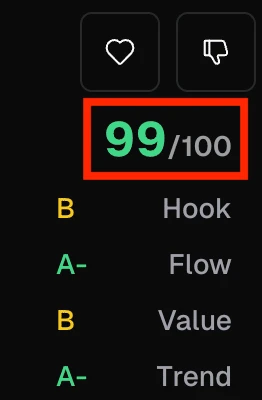
Image: OpusClip help center, Virality Score. - Better
Hands-on editing and project exports
OpusClip has a text and timeline editor, and Pro exports to Premiere Pro and DaVinci Resolve. klipan.ai has no timeline: you ask for changes in plain words, and you get a finished MP4 with no project file or SRT.
- Better
Posting built in
OpusClip can post and schedule your clips to social platforms for you. With klipan.ai you download the MP4 and post it yourself.
- Better
Teams, API and more than talking heads
OpusClip has team workspaces and an API, and it also clips gaming, vlogs and footage with little dialogue. klipan.ai is built for one person talking to camera.
Is klipan.ai cheaper than OpusClip?
- Free
- $0
- 60 credits a month, with a watermark and no editing
- Starter
- $15 / month
- 150 credits a month, billed monthly only
- Pro
- $29 / month
- 300 credits a month, or $14.50 a month billed yearly
klipan.ai- Starter
- $49 / month
- About 4 finished videos, one a week
- Pro
- $129 / month
- About 12 finished videos, three a week
- One more video
- $15
- Add a single video in a busy month
The Proud-to-Post Guarantee: we edit until you're proud to post it. If your first 3 videos aren't, your first month is refunded in full.
They charge for different things. OpusClip charges credits, one per minute of video you upload, with extra credits for some tools, and AI Producer spends credits in slices while it works. Its pages don't give a price per finished video. klipan.ai charges for the finished edit, which comes to about $12 a video on Starter or about $11 on Pro. Weigh that price against what one new client is worth to you: if a single client brings in more than a month of klipan.ai, it pays for itself. If your videos don't have a paid offer behind them yet, stick with OpusClip's free plan for now.
Where the editing hours go instead
Serving your clients
Running coaching sessions and calls to get your clients results.
Selling
Taking sales calls and following up in DMs with people who reached out after your video.
Creating
Planning what to say next and filming more often.
Building your offer
Working on your program, course or next launch.
Prices in US dollars, last checked November 1, 2026. OpusClip says its prices vary by region and app store.
OpusClip or klipan.ai: which is better for talking-head videos?
Both can now turn one raw take into a finished video. The difference is who decides the story: in OpusClip's AI Producer you direct the edit in chat, while klipan.ai works out the story and the opening before it edits.
Say you film three minutes on your phone: you restart your opening twice, wander off once, and your best line, the one that would make a client message you, comes at 1:52.
You do the edit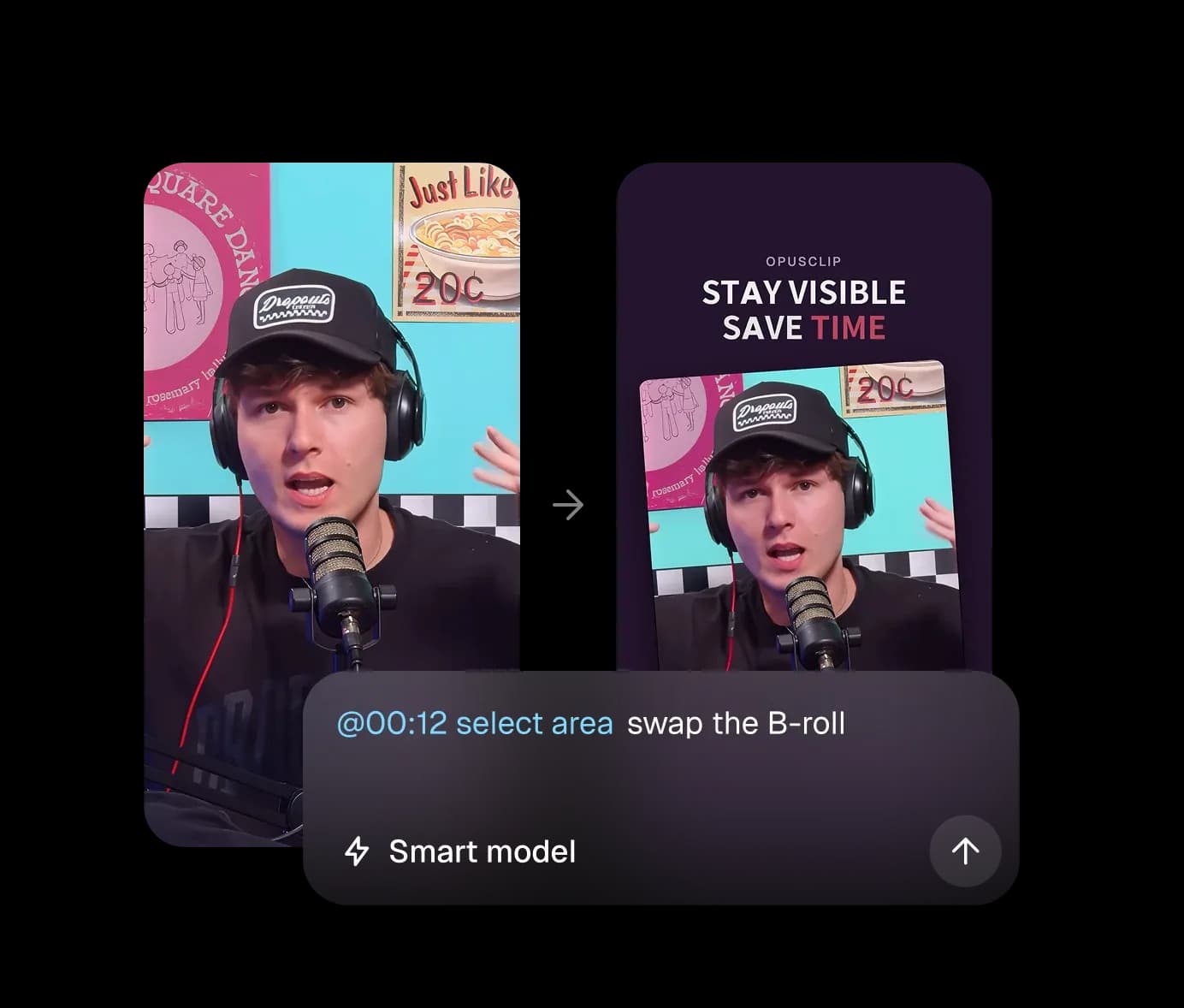
- 01You upload the take to AI Producer and write a brief in chat, like "cut the filler and add captions." It reads the footage and transcript and makes a first cut with captions, b-roll, motion graphics, music and sound effects.
- 02It cuts filler words and pauses. Its pages don't describe choosing between your restarts or moving 1:52 to the front, so you ask for that in chat. One of OpusClip's own example requests is "Cut everything before I say 'so here is the idea'."
- 03You review the preview and keep asking for changes in the same chat until you'd post it, then export one MP4 at up to 1080p.
klipan.aiThe edit comes back done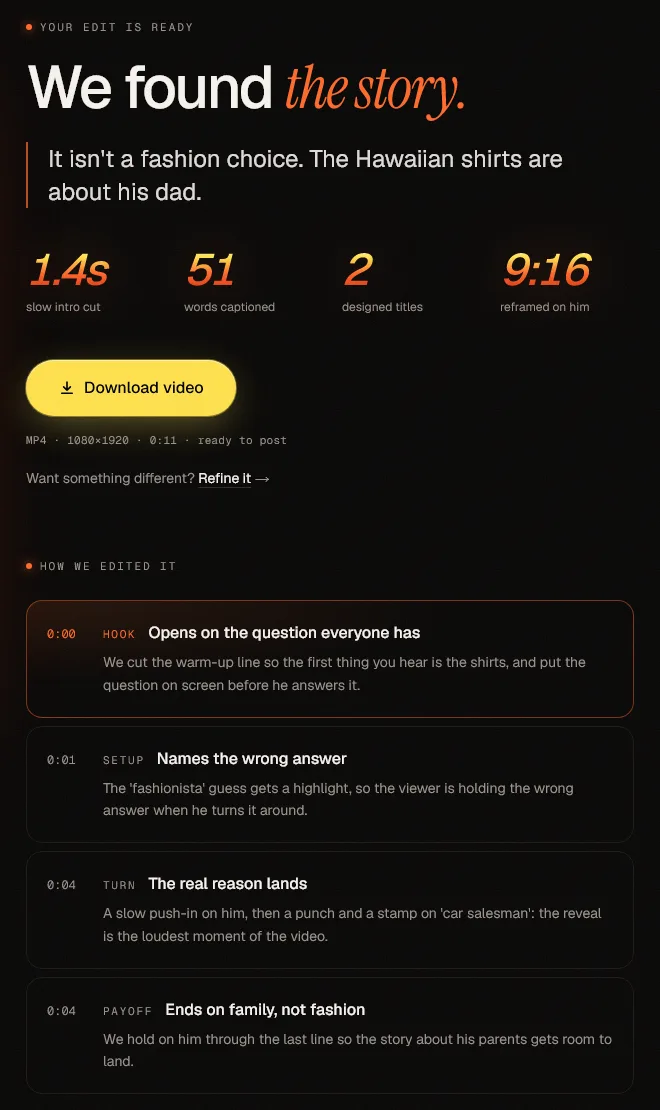
- 01You answer a few quick questions about the goal of the video, who it's for and what viewers should do next. klipan.ai goes through everything you said to find your main point, strongest hook and payoff.
- 02It cuts the restarts and dead air, keeps your best take of each line and moves 1:52 to the front, so the video opens on the hook.
- 03It adds visuals built around one idea to match what you're saying, along with captions, music, sound effects and clean audio. You usually get the video back in under an hour, and you can ask for changes in plain words.
What does klipan.ai do that OpusClip doesn't?
First it plans
- 01
It learns your goal
A few quick questions: what the video is for, who it's for, and what you want viewers to do afterwards.
- 02
It watches your whole video
It reads everything you said and picks the best version of each line.
- 03
It finds the story
Your main point, the moment that grabs attention, and the payoff.
- 04
It plans one visual idea
The graphics follow one idea that builds from start to finish.
Then it edits
Each clip below is a real klipan.ai edit, complete with captions, music, sound effects and clean audio.
Visuals that show what you're saying
Graphics, images and animations appear right as you make your point and follow one idea through the whole video.
Opens on your strongest line
If your strongest line came halfway through the take, it moves to the front so the people you want don't scroll past.
Clean cuts
It cuts out restarts and long pauses and keeps the best take of each line. In this clip, 41 seconds of raw footage comes down to 15.
How to compare OpusClip and klipan.ai on your own video
- Step 1
Pick a real raw take, two to five minutes (AI Producer's limit is five), with at least one restart, where your best line isn't the first thing you say.
- Step 2
Edit it in OpusClip's AI Producer until you'd post it. Write a short brief, then ask for changes in the chat. Time yourself.
- Step 3
Upload the same take to klipan.ai and answer its few quick questions. Note the minutes you spend on the questions, the upload and the review, but leave out the wait.
- Step 4
Put the two side by side. What does each one open on? Is any restart left in? How many of your minutes did each take?
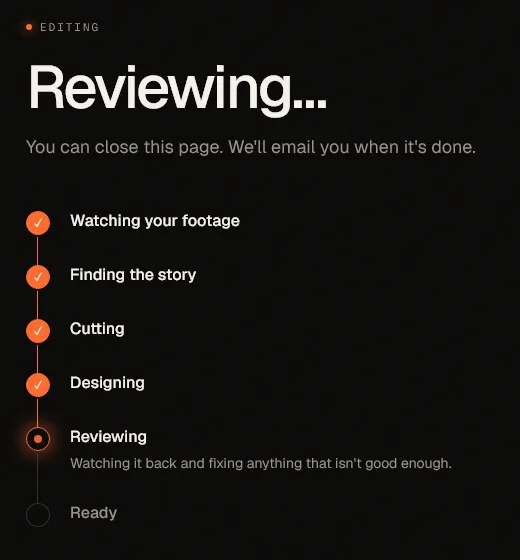
Compare the time you spent in step two with step three, and weigh that against the price and the wait. OpusClip has a free plan and a trial, though AI Producer spends credits as it works. On klipan.ai's side, the Proud-to-Post Guarantee refunds your first month if your first 3 videos aren't ones you're proud to post.
Is klipan.ai a good OpusClip alternative for coaches?
OpusClip is best for
- ✓Podcasters, streamers and webinar hosts who want many clips from every long video.
- ✓Anyone on a $0 budget, or without a paid offer behind their videos yet.
- ✓Teams that want to score, schedule and post clips from one place.
- ✓People who want to fine-tune clips themselves in a timeline, or export to Premiere Pro.
klipan.aiklipan.ai is best for
- ✓Coaches, consultants, course creators and experts who sell through their own face and voice.
- ✓Anyone with something to sell (a program, a course, a service) whose videos aren't bringing in clients yet.
- ✓Raw takes with restarts, flubs and long rambles.
- ✓People who'd rather spend the editing hours coaching, selling and filming.
OpusClip is not best for
- ✕Raw takes where the hard part is finding the story. Several 1- and 2-star Trustpilot reviews from April to June 2026 say its clips came from the wrong parts of the video and needed re-editing.
- ✕Takes longer than 5 minutes that you want edited as one video, since that's AI Producer's limit.
- ✕Anyone who wants AI Producer to be proven: it's in beta and has almost no public reviews yet.
klipan.aiklipan.ai is not best for
- ✕Anyone without a paid offer yet: a free tool is the better choice for now. Come back once you have something to sell.
- ✕Podcasters who want many clips from one long episode, or videos that aren't you talking to camera.
- ✕Anyone who needs a project file, an SRT file or automatic posting.
How we compared klipan.ai and OpusClip
We compared both using OpusClip's own pricing, product and help pages, read on November 1, 2026. If something is out of date, tell us and we'll fix it.
klipan.ai vs OpusClip: frequently asked questions
Is OpusClip's free plan enough for business videos?+
No. OpusClip's Terms only allow commercial use on paid plans, so business videos need Starter or Pro, and free plan clips carry a watermark and can only be exported for 3 days. On klipan.ai's side, your first month is covered by a guarantee. The Proud-to-Post Guarantee: we edit until you're proud to post it. If your first 3 videos aren't, your first month is refunded in full.
Can OpusClip edit a raw talking-head video like klipan.ai?+
Yes, with AI Producer, which is in beta and takes one video of up to 5 minutes. You write a brief in chat and ask for changes until you're happy, and it returns one MP4 with captions, b-roll, motion graphics and music. Its pages don't say it picks your best take of each line or opens on your strongest line, so you ask for that in chat, while klipan.ai works both out before it edits. OpusClip's clipper is made for long videos and returns only 1 or 2 clips from a video under 3 minutes.
Can I use OpusClip and klipan.ai together?+
Yes. Many people who talk to camera do both kinds of video: OpusClip for clipping long podcasts and webinars, and klipan.ai for the short videos you film to win clients. klipan.ai gives you a normal MP4, so you can post it anywhere.
Is OpusClip worth it for coaches, or is klipan.ai a better fit?+
It depends on what you film. On Trustpilot, OpusClip has 4.0 out of 5 from 512 reviews (November 1, 2026): happy reviewers say it's good at finding clips in long videos, while several 1- and 2-star reviews from 2026 say the clips came from the wrong parts and needed re-editing, and others complain about billing and credits. Those are users' opinions. If you film short takes to win clients, choose by whether you want to direct the edit yourself in OpusClip or have it planned for you in klipan.ai.
Does OpusClip or klipan.ai use AI avatars?+
Neither does when it edits your footage. OpusClip's AI Producer edits real footage only, though OpusClip's separate Agent Opus makes videos with AI avatars. klipan.ai only edits footage of the real you: it never generates faces or voices, and it doesn't invent stats, results or testimonials.
Will OpusClip or klipan.ai get me more clients?+
Nobody honest can promise views or clients. We promise the edit.
Something else? Ask support.
Your next video is already on your phone.
The Proud-to-Post Guarantee: we edit until you're proud to post it. If your first 3 videos aren't, your first month is refunded in full.